AI Crawlers and llms.txt: How to Let ChatGPT, Perplexity and Google Read Your Site
Which AI crawlers to allow in robots.txt (GPTBot, OAI-SearchBot, PerplexityBot, Google-Extended, Bingbot) and what an llms.txt file actually changes.
By Godefroy de Compreignac , Founder of Bibop
November 15, 2026 13 min read
Key takeaways
- AI crawlers serve three purposes: search, visits a user asks for, and model training. You allow or block each crawler separately in your robots.txt.
- Blocking GPTBot, OpenAI’s training crawler, only keeps your pages out of its model training data. ChatGPT can still cite your pages as long as its search crawler, OAI-SearchBot, can read them.
- A host or firewall can block AI crawlers even when your robots.txt allows them. Check their settings whenever you change plans or providers.
- Almost no AI engine reads llms.txt, a file meant to introduce a site to language models. Let your site builder make one if it does so on its own, but don’t pay for one.
- Google’s AI Overviews and AI Mode pick their sources from pages Googlebot has crawled. Blocking Google-Extended only keeps you out of Gemini training and Gemini app answers.
ChatGPT, Perplexity, Claude, Google and Copilot read your site through their search crawlers: OAI-SearchBot for ChatGPT, PerplexityBot, Claude-SearchBot, Googlebot and Bingbot. Your robots.txt file has to let them in. You set training crawlers such as GPTBot and ClaudeBot separately: blocking them keeps your pages out of model training and leaves them citable in answers. Almost no AI engine reads the llms.txt file: Ahrefs found that in May 2026, 97% of these files had received no requests at all. Below you’ll find the crawlers worth knowing, a robots.txt file you can copy, the host settings that block AI engines without telling you, and what llms.txt is really worth.
AI crawlers serve three different purposes
A crawler is a program that visits a site’s pages to read them. It identifies itself by a name, its “user agent”. You allow or block each crawler by that name in your robots.txt file. Most AI companies split their crawlers by what they do with the pages:
- The search crawler goes through the web to fill the index the AI draws its sources from. Block it and your pages can no longer be cited.
- The user-triggered fetcher opens a page on demand, when a user asks a question or pastes a link into the conversation.
- The training crawler collects pages that may be used to train future models. Blocking it leaves your citations intact.
| Company | Search crawler | User-triggered fetcher | Training crawler |
|---|---|---|---|
| OpenAI (ChatGPT) | OAI-SearchBot | ChatGPT-User | GPTBot |
| Anthropic (Claude) | Claude-SearchBot | Claude-User | ClaudeBot |
| Perplexity | PerplexityBot | Perplexity-User | None, according to Perplexity |
| Google (AI Overviews, AI Mode, Gemini) | Googlebot | No separate crawler | Google-Extended, a rule with no crawler of its own |
| Microsoft (Bing, Copilot) | Bingbot | No separate crawler | A per-page preference, no crawler of its own |
OpenAI describes its four crawlers. Each setting there is independent of the others: a site that blocks GPTBot can still show up in ChatGPT’s answers as long as it lets OAI-SearchBot in. OpenAI also says it takes about 24 hours for ChatGPT to pick up a robots.txt change.
Anthropic splits ClaudeBot, Claude-User and Claude-SearchBot the same way. Blocking one doesn’t block the other two.
Perplexity states that PerplexityBot collects nothing to train models.
User-triggered fetchers follow looser rules. OpenAI writes that robots.txt rules “may not apply” to ChatGPT-User, since a user asked for the visit. Perplexity goes further: Perplexity-User “generally ignores” robots.txt. These two fetchers only read the page a user asked for, when the user asks, without filling an index.
Google and Bing use their usual search crawler for AI answers
Google has no separate crawler for its AI features. AI Overviews and AI Mode pick their sources from the Google Search index, which Googlebot fills. A page Google indexes well can be cited without any extra setting. We cover how Google picks the sources of its AI Overviews.
Google-Extended is a rule with no crawler behind it: a name you write in your robots.txt to say whether pages Googlebot has read may be used to train Gemini models and to feed answers in the Gemini app. Google states that this rule has no effect on your inclusion in Google Search or on your rankings.
Copilot, Microsoft’s assistant, answers from the Bing index, which Bingbot fills. Microsoft documents no crawler of Copilot’s own. Blocking Bingbot therefore takes you out of both Bing and Copilot’s answers. Microsoft announced new preferences in October 2026, set page by page, to keep your pages out of Copilot’s answers while staying in Bing:
- The tag
<meta name="Bingbot" content="ai-grounding:disallow">removes a page from Copilot’s answers and from Microsoft’s other web-grounded answers. - The tag
<meta name="Bingbot" content="ai-training:disallow">removes a page from model training. - These preferences take effect on February 1, 2027. After March 1, 2027, Bing will no longer read the
noarchiveandnocachetags as opt-outs from AI use.
Which crawlers to allow, and which to block
If you want AI engines to cite your company, allow every search crawler and every user-triggered fetcher. A blocked crawler stops the matching AI from reading your pages when it answers, so it cites other sites, often your competitors’.
Training is a separate decision. A model that answers without searching relies on what it learned during training. A company described accurately in the training data stands a better chance of being named in those answers. If your business runs on quote requests, let GPTBot and ClaudeBot in: you have more to gain than to lose.
Block training if you sell your writing, as a media outlet, a course publisher or a paid database does. You still keep your citations in answers, since the search crawlers stay open. Keep in mind that Google-Extended also covers answers in the Gemini app, so blocking it takes you out of them.
A working group at the IETF, the body that writes the internet’s technical standards, published a draft rule on October 30, 2026 for opting out of training in one line, under the name __usage_ai-training. Bing already honors it. Google plans to follow in early 2027. Keep your crawler-by-crawler rules until the other AI companies adopt it.
A robots.txt file that lets AI engines in
The robots.txt file sits at the root of your site, at https://yoursite.com/robots.txt. Here is an example that lets AI search crawlers and user-triggered fetchers in and opts out of training, if that’s your choice:
# AI search crawlers and user-triggered fetchers: let them in
User-agent: OAI-SearchBot
User-agent: ChatGPT-User
User-agent: PerplexityBot
User-agent: Perplexity-User
User-agent: Claude-SearchBot
User-agent: Claude-User
Allow: /

# Model training: keep this block only if you opt out
User-agent: GPTBot
User-agent: ClaudeBot
User-agent: Google-Extended
Disallow: /

# Every other crawler, Googlebot and Bingbot included
User-agent: *
Allow: /

Sitemap: https://yoursite.com/sitemap.xml
A file holding only User-agent: * followed by Allow: / already lets everyone in. Blocks that name each crawler make your choice readable and let AI engines in when a stricter general rule blocks parts of the site.
Reread it after every redesign
A stray Disallow: / left over from a staging site is enough to close the whole site to Google and to AI engines alike. Open your robots.txt in a browser after every major release.
Your host can block AI crawlers for you
Some hosts, firewalls and content delivery networks (CDNs) block AI crawlers before they even read the file. Cloudflare has blocked AI crawlers by default on new domains since July 1, 2025, and asks every new customer whether to allow them. A site launched on or migrated to Cloudflare since then can be closed to AI engines without anyone having decided it.
Check three things:
- In your host’s or CDN’s dashboard, look for a setting about AI crawlers (“AI bots”, “AI crawlers” or “bot protection”) and see what it blocks.
- In your server logs, search for OAI-SearchBot, PerplexityBot or Claude-SearchBot. A crawler that gets a 403 error on every page is blocked upstream of your
robots.txt. - In your analytics, look for visits tagged
utm_source=chatgpt.com. OpenAI adds this parameter to the links ChatGPT shows.
Any program can pose as GPTBot by borrowing its name. To check that a visit really comes from OpenAI, compare its IP address with the ones OpenAI publishes for each crawler, such as GPTBot’s address list.
Almost no AI engine reads llms.txt
The llms.txt file was proposed by Jeremy Howard, cofounder of the research lab Answer.AI, on September 3, 2024. This Markdown text file sits at the root of the site, introduces the site in a few lines and lists its key pages, each with a link to a Markdown version free of menus and scripts. The idea was to help a language model find the essentials of a site without going through all the HTML.
More and more sites publish the file. The software company Originality.ai counted 36,120 llms.txt files in May 2026, up from 4,088 in June 2025, across more than 3 million sites it tracks.
AI engines, on the other hand, barely read it:
- Ahrefs, an SEO tools company, analyzed traffic on 137,210 domains in May 2026, about 38,000 of which publish an
llms.txt. 97% of those files received no requests during the month. AI retrieval bots made up only 1.1% of the requests these files received overall, far behind SEO audit tools (21.7%). - Google writes that Google Search ignores these files.
- John Mueller, Google’s Search Advocate, compares the file to the keywords meta tag, which Google has ignored for years. In his view, no AI service has said it uses the file. Server logs even show that their crawlers don’t request it.
The programs that do read llms.txt are mostly coding assistants, which use it to work through technical documentation. According to Ahrefs, Claude Code requested these files more often than any AI retrieval bot. A software company that publishes developer documentation has a real use for the file.
The file changes nothing about a company website’s citations, but it’s harmless: Bibop’s own site publishes one, generated automatically at every release along with a Markdown version of every page. If your site builder makes it for you, let it. But don’t pay for an “AI SEO” service built around this file. Spend an hour checking your robots.txt and your host’s settings instead: you’ll get far more out of it.
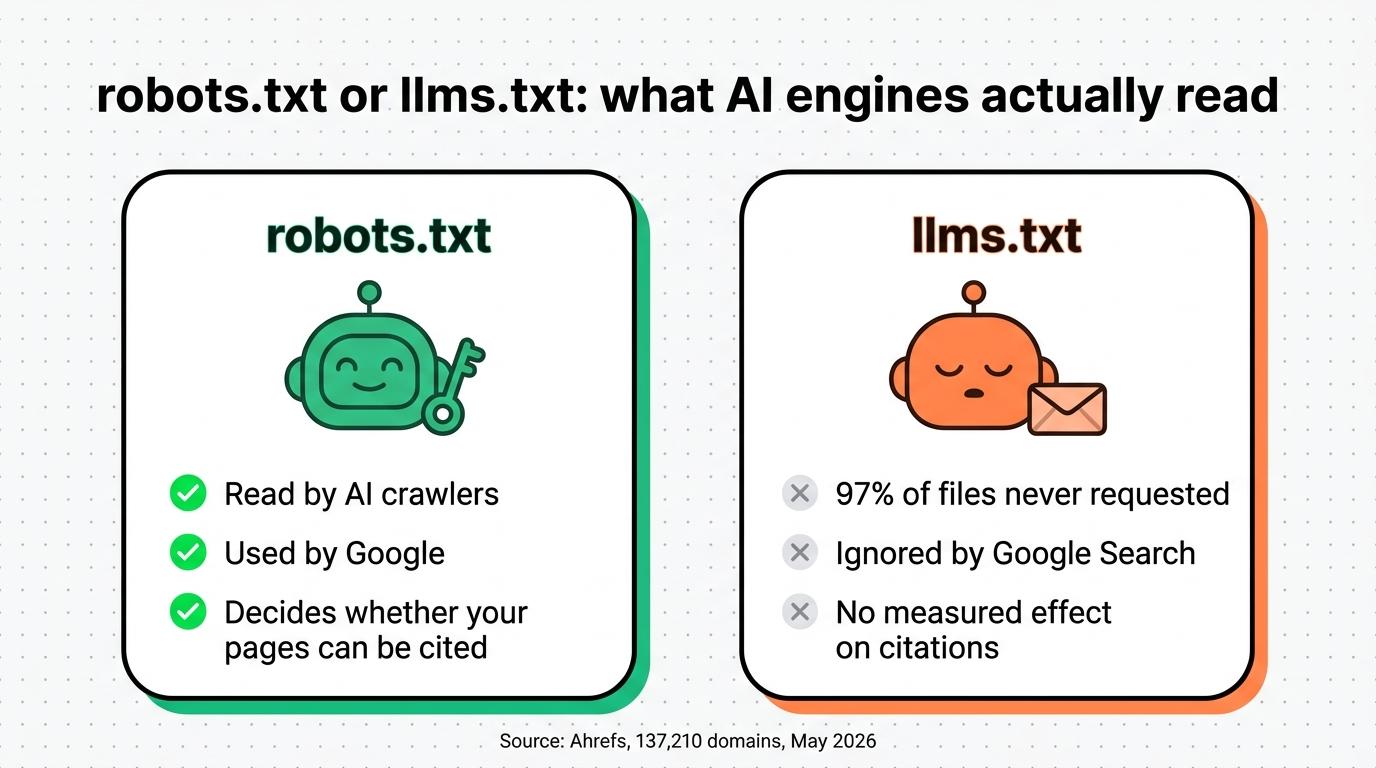
| robots.txt | llms.txt | |
|---|---|---|
| Purpose | Allow or block each crawler | Introduce the site and its key pages to a language model |
| Read by AI engines | Yes, by their search and training crawlers | Rarely, mostly by coding assistants |
| Used by Google | Yes | No, Google Search ignores it |
| Effect on your citations | Decisive: blocking an AI’s search crawler stops it from citing your pages | No measured effect |
| Status | Standard since 1994, published by the IETF in 2022 (RFC 9309) | Proposal published in 2024, not adopted by AI companies |
How to get indexed in ChatGPT?
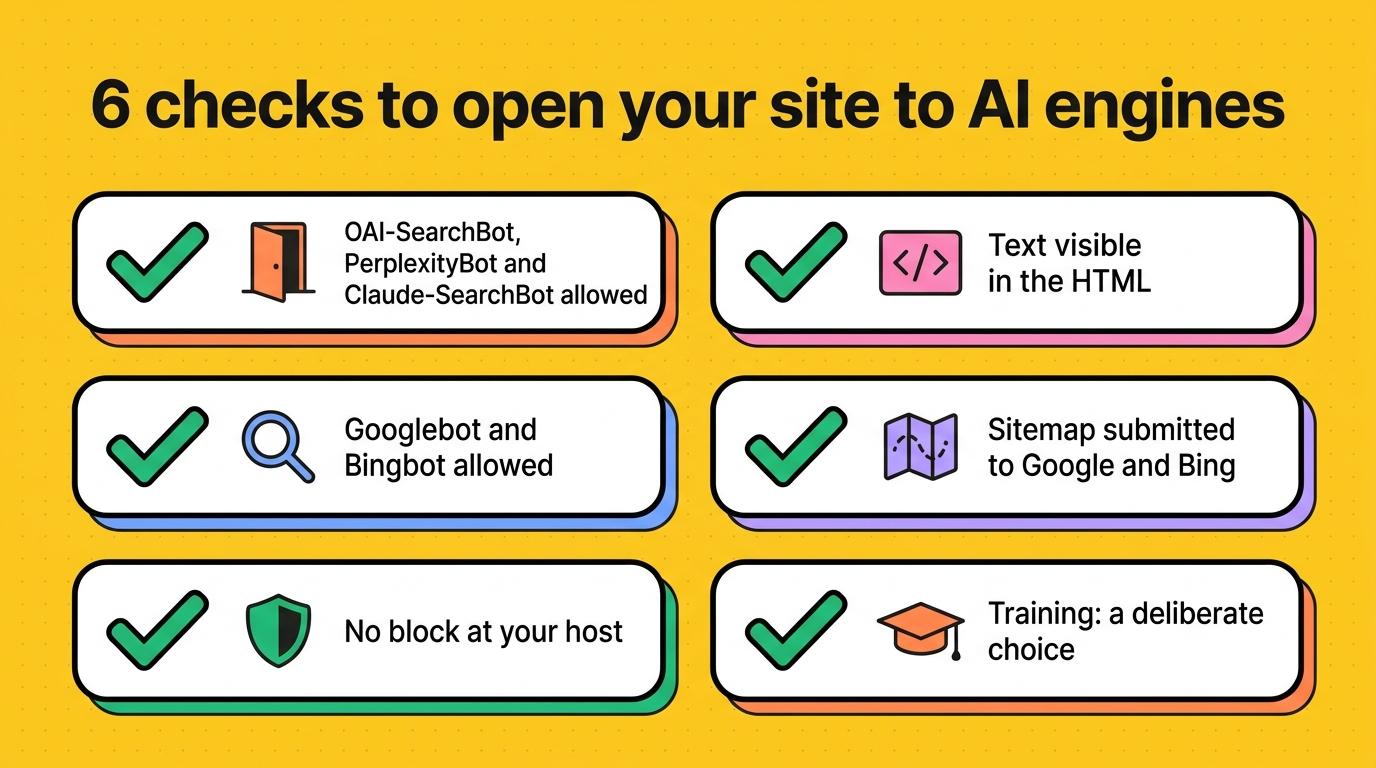
ChatGPT has no sign-up form. OpenAI says that any public website can appear in ChatGPT’s answers, as long as it lets OAI-SearchBot in. A page has to meet four conditions to be cited there:
- OAI-SearchBot can read the page, with no block in
robots.txtor at your host. - The text is in the HTML the server sends. AI crawlers read that HTML without running JavaScript, so text that only appears after a script loads stays invisible to them.
- The page is indexed by Google and Bing. Submit your sitemap in Search Console and in Bing Webmaster Tools, since AI engines also rely on these indexes to find their sources.
- The page answers a question your customers ask, clearly and in its first lines, with facts they won’t find elsewhere: your prices, your lead times, your customer stories.
Crawler access, text in the HTML and indexing make the page readable by the AI. The AI then cites, among readable pages, the one that answers the question best. We cover how to get cited by ChatGPT and Perplexity.
To remove a page from ChatGPT’s answers, put a noindex tag on the page rather than blocking it in robots.txt. OpenAI notes that its crawler has to be able to open the page to read that tag.
Bibop checks AI crawler access to your site every day
Bibop is a visibility agent for Google and AI answers. It checks your site every day, robots.txt included, makes sure the crawlers of ChatGPT, Claude and Perplexity can reach it, and fixes what blocks them itself. Each week, it asks ChatGPT, Perplexity and Google’s AI Mode 50 of your customers’ questions, then records who gets cited, you or a competitor.
Bibop edits your site’s files the way a developer would, with no script injected in the browser, so AI crawlers read exactly what your visitors read. Whoever manages your site will find the setup and security details.
See what Bibop does day to day, or go straight to pricing and guarantees: the subscription costs €90 excl. VAT a month$100 excl. VAT a month with no commitment. Your first month is refunded if you ask within 30 days.
Your questions about AI crawlers and llms.txt.
What is GPTBot?
GPTBot is OpenAI’s crawler that collects pages that may be used to train its models. ChatGPT finds the sources it cites through another crawler, OAI-SearchBot. You can block GPTBot in your robots.txt and stay visible in ChatGPT’s answers.
Does blocking GPTBot remove me from ChatGPT?
No. OpenAI treats each crawler separately. Blocking GPTBot keeps your pages out of future model training, but ChatGPT can still cite them as long as OAI-SearchBot has access. ChatGPT picks up a robots.txt change in about 24 hours.
Should I create an llms.txt file?
No, your pages can get cited without one. Ahrefs found that in May 2026, 97% of the llms.txt files it studied had received no requests. Google Search ignores them too. The file mostly serves coding assistants reading technical documentation. Create one only if it costs you nothing.
Does Google-Extended remove my site from AI Overviews?
No. AI Overviews and AI Mode pick their sources from the Google Search index, which Googlebot fills. Google-Extended covers Gemini model training and answers in the Gemini app. To leave AI Overviews, use the generative AI setting in Search Console.
How do I know whether AI crawlers visit my site?
Search your server logs for their names (OAI-SearchBot, GPTBot, PerplexityBot, ClaudeBot), and check that they get your pages rather than a 403 error. In your analytics, visits from ChatGPT carry the utm_source=chatgpt.com parameter.
